 Industry News
Using Google Apps for Your Property Management Company
 Stephen Fox
The property management business is very demanding. From tenants, owners, co-workers, to maintenance technicians, someone is always trying to get a hold of you.
Keeping everything organized is essential for success. If you are constantly multitasking and always on-the-go, incorporating technology tools in your arsenal is a great solution.
The Google Apps Suite, which includes tools such as Google Drive, Google Docs, Google Sheets, Google Calendar, Gmail, Google Meet, and Google Forms, can help you run an efficient property management company.
Running an efficient company and building out standard operating procedures will give you the ability to manage thousands of properties easily.
For this reason, we decided to write an article going through all the tools Google Apps offers that can be used by your company.
Google Apps You Should Use for Your Property Management Company
1. Gmail
It goes without saying that email is an absolute necessity for your company. You need a reliable email provider to communicate with owners, tenants, and vendors.
Gmail leads the rest of the e-mail application pack in areas like cost, convenience, and integration. It comes equipped with plenty of flexibility and storage.
Here are the other benefits of using Gmail:
- Ability to integrate with Google Hangouts.
Google Hangouts is Google’s video application tool. It's very similar to Skype and can be used for video conferencing and screen sharing. It helps keep group communications organized.
- Easy to set up a professional e-mail address.
You can set up a professional email address to create a great impression for your property management business. Rather than the generic ‘@gmail.com’, you can use your own domain name. Professional email addresses cost as little as $5/month and add credibility to your company.
- It’s very secure.
As far as email services go, the security for Google’s email system is one of the best in the market. The platform has a two-factor authentication process as well as a strong antivirus scan to help secure your account.
2. Google Calendar
Google Calendar can help you improve communication and efficiency in your property management business.
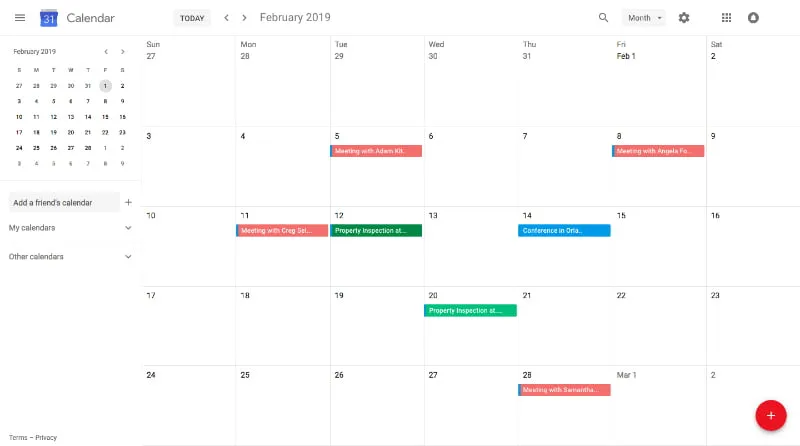
The following are some benefits of Google Calendar:
It’s easy to sync Google Calendar with Microsoft Outlook, Apple iCal, and other similar programs.
Reminders can be set up for events and then be texted or emailed to you.
Google Calendar can be used to send meeting invitations.
You can use Google Calendar to keep track of meetings, appointments, birthdays, and so on.
3. Google Drive
This is the equivalent of Dropbox and is one of our favorite features of Google Apps. By storing all your property management files on Google Drive, you always have them available to you wherever you have an internet connection.
The ability to access Google Drive from any location with internet access is extremely valuable. If a staff member is out showing a property but can't remember the applicant criteria, they can easily access this information through Google Drive.
The following are some benefits of using Google Drive:
- The ability to back up your files.
Maintaining a proper file management system for your property management company can save you time and help keep your company organized. You can store all your standard forms on Google Drive for quick and easy access.
- It has a search functionality.
Google Drive has an efficient built-in search engine. It allows you to search based on various metrics. For example, you can search by owner, by keyword, or by file type.
Besides its search functionality, Google Drive also has an optical character recognition technology. This can assist you in looking up someone or something.
- It gives you the ability to open and edit documents.
From Adobe Suite files to spreadsheets, and Microsoft documents, Google Drive gives you the ability to open any file type.
4. Google Docs
Google Docs is part of Google Apps. It offers convenience, considerable storage and easy access from mobile devices and computers.
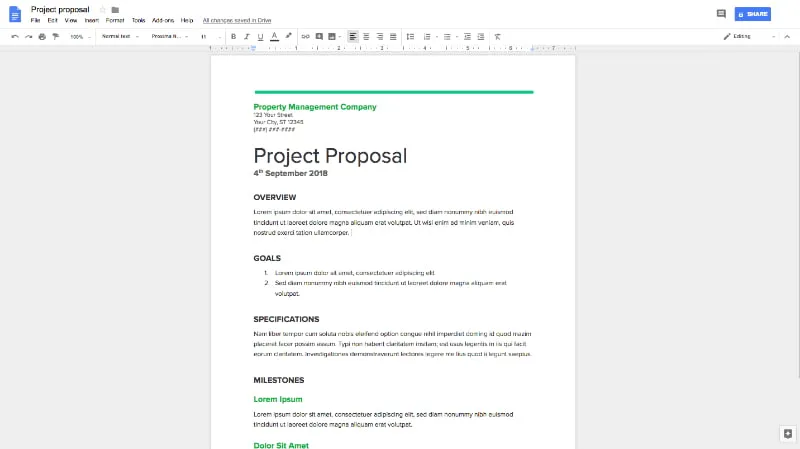
These are the benefits of using Google Docs for your property management company:
- Ability to go mobile.
Google Docs is available on the go. It has apps for both iPhone and Android.
- Store your work on the cloud.
With Google Docs, your work is constantly updated in real time and saved to the cloud. You will never have to worry about a power outage wiping out all your progress.You'll also have the ability for multiple staff to access a document at the same time.
- Ability to collaborate with remote workers.
This is one of the best features of Google Docs. It gives you the ability to share documents you are working on with remote employees and co-workers. It even shows you who is responsible for each edit through the color-coded functionality. If you're planning on hiring a virtual assistant, this is a great tool to use.
5. Google Sheets
You can use spreadsheets to better manage your properties. Google Sheets offers a Template Gallery, where you can search for your preferred template.
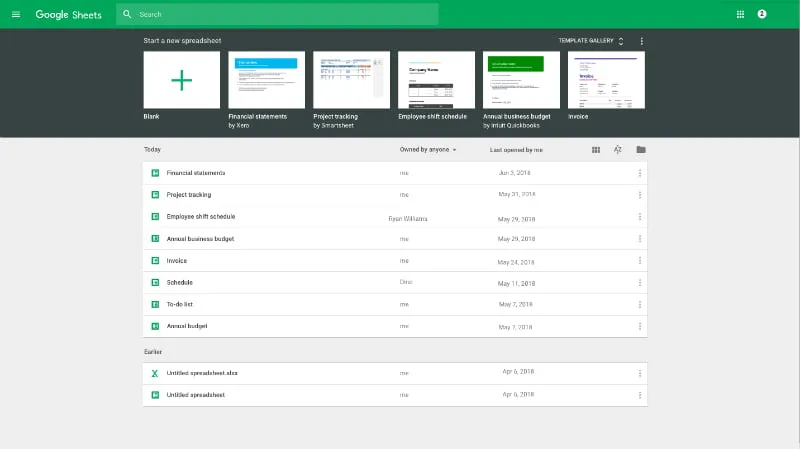
Just like others in the Google Apps Suite, Google Sheets is free with no installation required. To access Google Sheets, all you need is a web browser, a Google account, and internet connection.
The following are some benefits of Google Sheets as a property manager:
- Common formatting options are available.
You can improve the look of the spreadsheet in any way you like. You can alter the font size and style, apply number formatting, and change colors to the those you prefer.
- Formulas can be created to perform automatic calculations.
Just like in Excel, you can create formulas to perform calculations. In addition, there is also an extensive list of built-in functions to use. If you're currently using Excel sheets in your company, it's time to make the switch to Google Sheets.
- You can access Google Sheets offline.
Previously, offline editing was only available for Google Slides and Google Docs. But now, this feature has also been added to Google Sheets.
6. Google Meet
Among the key tenets of creating a successful and positive property owner- property manager relationship is proper communication. The communication could be in the form of phone conversations, online discussions or in-person meetings.
Google Meet makes managing online discussions and scheduling very easy. To use it, you must first have a G Suite account. The basic G Suite account costs around $50 per year.
Benefits of using Google Meet:
The ability to record meetings and save them on Google Drive.
Join a meeting directly from a conference room, through your mobile device, or desktop computer.
Reduce the cost of travel, since you have the ability to make a video call.
Connect with your team from anywhere.
7. Google Forms
Google Forms has the ability to create surveys. You can use tenant surveys to evaluate your tenant’s perception and experience with their rental property, the maintenance, customer service, amenities, community, neighborhood, and management.
By asking and listening to your tenants’ feedback you will be able to improve tenant retention, evaluate personnel performance, enhance your competitive position, and increase occupancy.
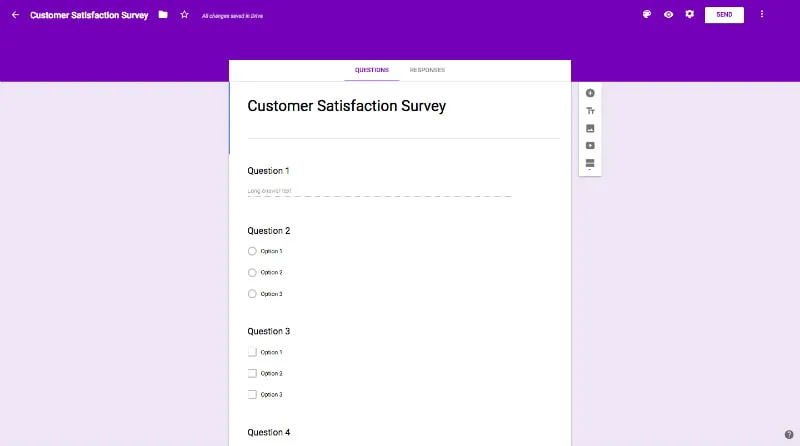
Here are some benefits of using Google Forms:
Google Forms is probably the only free polling software that supports logic branching. Logic branching allows you to create different sets of questions based on prior responses.
Google Forms support a wide range of question types including scale and grid.
You can choose to get e-mail notifications as tenants fill in a Google form with their responses.
The forms created with Google Docs are mobile friendly, so your tenants can send their responses from mobile phone browsers.
By incorporating Google Apps into your property management company's standard operation procedures, you will be able to achieve efficiency, quality output, and uniformity of performance.
Also, as a property manager, you will be able to stay organized. Good organization skills will save you time and inconvenience.
Important Files That Google Apps Can Help You Keep Organized

Business Documents
Legal documents and records
Employee records
Audit records
Tax returns and supporting tax documents
Insurance documents
Business licenses and permits
The files you add to Google Drive are stored on servers in secure data centers. Your data stored with Google is encrypted during transfer from your computer — and while it sits on Google Drive servers.
Financial Records
Security deposit refund and deduction records
Purchase orders
Invoices and receipts
Personal funds ledger
Tenant and owner ledgers
Bank statements
Vendor Files
Payment records
Invoices and receipts
Email and correspondence
Vendor contracts
Vendor screening files
Property Files
Invoices and receipts for property maintenance
Photos related to property maintenance and property damage
Marketing information and property photos
Insurance policies
Inspection records and maintenance updates
Property deeds and mortgage information if applicable
Owner Files
All e-mails and correspondence with owners
Owner rent payments and payments using owner funds
Management fee payment records
Owner-Manager agreement
Tenant Files
Move-in inspection and move-out inspection paperwork
Security deposits, security deposit refunds, and an itemized list of any deductions
Correspondence regarding approval or denial of rental application
Records of rent payment
Property maintenance notices
Ultimately, Google Apps can save you money, time, and hassle. With improved efficiency, you will be able to build out processes that enable you to manage thousands of properties.
In addition to Google Apps, make sure your property management company has effective standard operating processes. These processes will help you scale your business.
About Author
Former CPA at Ernst & Young who traded spreadsheets for strategy. Stephen co-founded Upkeep Media in 2015 with a vision to build the most specialized property management marketing agency in North America. His financial acumen and competitive drive have been the foundation of Upkeep's growth.
Industry NewsUsing Google Apps for Your Property Management Company
The property management business is very demanding. From tenants, owners, co-workers, to maintenance technicians, someone is always trying to get a hold of you.
Keeping everything organized is essential for success. If you are constantly multitasking and always on-the-go, incorporating technology tools in your arsenal is a great solution.
The Google Apps Suite, which includes tools such as Google Drive, Google Docs, Google Sheets, Google Calendar, Gmail, Google Meet, and Google Forms, can help you run an efficient property management company.
Running an efficient company and building out standard operating procedures will give you the ability to manage thousands of properties easily.
For this reason, we decided to write an article going through all the tools Google Apps offers that can be used by your company.
Google Apps You Should Use for Your Property Management Company
1. Gmail
It goes without saying that email is an absolute necessity for your company. You need a reliable email provider to communicate with owners, tenants, and vendors.
Gmail leads the rest of the e-mail application pack in areas like cost, convenience, and integration. It comes equipped with plenty of flexibility and storage.
Here are the other benefits of using Gmail:
- Ability to integrate with Google Hangouts.
Google Hangouts is Google’s video application tool. It's very similar to Skype and can be used for video conferencing and screen sharing. It helps keep group communications organized.
- Easy to set up a professional e-mail address.
You can set up a professional email address to create a great impression for your property management business. Rather than the generic ‘@gmail.com’, you can use your own domain name. Professional email addresses cost as little as $5/month and add credibility to your company.
- It’s very secure.
As far as email services go, the security for Google’s email system is one of the best in the market. The platform has a two-factor authentication process as well as a strong antivirus scan to help secure your account.
2. Google Calendar
Google Calendar can help you improve communication and efficiency in your property management business.
The following are some benefits of Google Calendar:
It’s easy to sync Google Calendar with Microsoft Outlook, Apple iCal, and other similar programs.
Reminders can be set up for events and then be texted or emailed to you.
Google Calendar can be used to send meeting invitations.
You can use Google Calendar to keep track of meetings, appointments, birthdays, and so on.
3. Google Drive
This is the equivalent of Dropbox and is one of our favorite features of Google Apps. By storing all your property management files on Google Drive, you always have them available to you wherever you have an internet connection.
The ability to access Google Drive from any location with internet access is extremely valuable. If a staff member is out showing a property but can't remember the applicant criteria, they can easily access this information through Google Drive.
The following are some benefits of using Google Drive:
- The ability to back up your files.
Maintaining a proper file management system for your property management company can save you time and help keep your company organized. You can store all your standard forms on Google Drive for quick and easy access.
- It has a search functionality.
Google Drive has an efficient built-in search engine. It allows you to search based on various metrics. For example, you can search by owner, by keyword, or by file type.
Besides its search functionality, Google Drive also has an optical character recognition technology. This can assist you in looking up someone or something.
- It gives you the ability to open and edit documents.
From Adobe Suite files to spreadsheets, and Microsoft documents, Google Drive gives you the ability to open any file type.
4. Google Docs
Google Docs is part of Google Apps. It offers convenience, considerable storage and easy access from mobile devices and computers.
These are the benefits of using Google Docs for your property management company:
- Ability to go mobile.
Google Docs is available on the go. It has apps for both iPhone and Android.
- Store your work on the cloud.
With Google Docs, your work is constantly updated in real time and saved to the cloud. You will never have to worry about a power outage wiping out all your progress.You'll also have the ability for multiple staff to access a document at the same time.
- Ability to collaborate with remote workers.
This is one of the best features of Google Docs. It gives you the ability to share documents you are working on with remote employees and co-workers. It even shows you who is responsible for each edit through the color-coded functionality. If you're planning on hiring a virtual assistant, this is a great tool to use.
5. Google Sheets
You can use spreadsheets to better manage your properties. Google Sheets offers a Template Gallery, where you can search for your preferred template.
Just like others in the Google Apps Suite, Google Sheets is free with no installation required. To access Google Sheets, all you need is a web browser, a Google account, and internet connection.
The following are some benefits of Google Sheets as a property manager:
- Common formatting options are available.
You can improve the look of the spreadsheet in any way you like. You can alter the font size and style, apply number formatting, and change colors to the those you prefer.
- Formulas can be created to perform automatic calculations.
Just like in Excel, you can create formulas to perform calculations. In addition, there is also an extensive list of built-in functions to use. If you're currently using Excel sheets in your company, it's time to make the switch to Google Sheets.
- You can access Google Sheets offline.
Previously, offline editing was only available for Google Slides and Google Docs. But now, this feature has also been added to Google Sheets.
6. Google Meet
Among the key tenets of creating a successful and positive property owner- property manager relationship is proper communication. The communication could be in the form of phone conversations, online discussions or in-person meetings.
Google Meet makes managing online discussions and scheduling very easy. To use it, you must first have a G Suite account. The basic G Suite account costs around $50 per year.
Benefits of using Google Meet:
The ability to record meetings and save them on Google Drive.
Join a meeting directly from a conference room, through your mobile device, or desktop computer.
Reduce the cost of travel, since you have the ability to make a video call.
Connect with your team from anywhere.
7. Google Forms
Google Forms has the ability to create surveys. You can use tenant surveys to evaluate your tenant’s perception and experience with their rental property, the maintenance, customer service, amenities, community, neighborhood, and management.
By asking and listening to your tenants’ feedback you will be able to improve tenant retention, evaluate personnel performance, enhance your competitive position, and increase occupancy.
Here are some benefits of using Google Forms:
Google Forms is probably the only free polling software that supports logic branching. Logic branching allows you to create different sets of questions based on prior responses.
Google Forms support a wide range of question types including scale and grid.
You can choose to get e-mail notifications as tenants fill in a Google form with their responses.
The forms created with Google Docs are mobile friendly, so your tenants can send their responses from mobile phone browsers.
By incorporating Google Apps into your property management company's standard operation procedures, you will be able to achieve efficiency, quality output, and uniformity of performance.
Also, as a property manager, you will be able to stay organized. Good organization skills will save you time and inconvenience.
Important Files That Google Apps Can Help You Keep Organized
Business Documents
Legal documents and records
Employee records
Audit records
Tax returns and supporting tax documents
Insurance documents
Business licenses and permits
The files you add to Google Drive are stored on servers in secure data centers. Your data stored with Google is encrypted during transfer from your computer — and while it sits on Google Drive servers.
Financial Records
Security deposit refund and deduction records
Purchase orders
Invoices and receipts
Personal funds ledger
Tenant and owner ledgers
Bank statements
Vendor Files
Payment records
Invoices and receipts
Email and correspondence
Vendor contracts
Vendor screening files
Property Files
Invoices and receipts for property maintenance
Photos related to property maintenance and property damage
Marketing information and property photos
Insurance policies
Inspection records and maintenance updates
Property deeds and mortgage information if applicable
Owner Files
All e-mails and correspondence with owners
Owner rent payments and payments using owner funds
Management fee payment records
Owner-Manager agreement
Tenant Files
Move-in inspection and move-out inspection paperwork
Security deposits, security deposit refunds, and an itemized list of any deductions
Correspondence regarding approval or denial of rental application
Records of rent payment
Property maintenance notices
Ultimately, Google Apps can save you money, time, and hassle. With improved efficiency, you will be able to build out processes that enable you to manage thousands of properties.
In addition to Google Apps, make sure your property management company has effective standard operating processes. These processes will help you scale your business.
About Author
Former CPA at Ernst & Young who traded spreadsheets for strategy. Stephen co-founded Upkeep Media in 2015 with a vision to build the most specialized property management marketing agency in North America. His financial acumen and competitive drive have been the foundation of Upkeep's growth.
Newsletter
Get Weekly PM
Marketing Tips
Join 5,000+ property management professionals who get our weekly marketing insights delivered to their inbox.
Top Case Studies
McCaw Property Management Case Study
From invisible online to the #1 ranked PM company in their market with 143 new doors in 16 months.
Popular Posts
The Property Management Growth Playbook
Newsletter
Get Weekly PM
Marketing Tips
Join 5,000+ property management professionals who get our weekly marketing insights delivered to their inbox.
Top Case Studies
McCaw Property Management Case Study
From invisible online to the #1 ranked PM company in their market with 143 new doors in 16 months.
The Property Management Growth Playbook
Blogs
Read More Blogs

Newsletter
Get Weekly PM
Marketing Tips
Join 5,000+ property management professionals who get our weekly marketing insights delivered to their inbox.
Newsletter
Never Miss a PM Marketing Insight
Join 5,000+ property management professionals who get our weekly marketing insights delivered to their inbox.